Getting started
Install Vernaku, meet the quick panel and start using it on Reddit, X and YouTube in minutes.
Install the extension
Vernaku is a free browser extension for Chrome and Microsoft Edge.
- 1
Search for “Vernaku” in the Chrome Web Store or Microsoft Edge Add-ons.
- 2
Click “Add to Chrome” (“Get” in Edge) and confirm.
- 3
Open Reddit, X (x.com) or YouTube — Vernaku starts working right away.
The quick panel
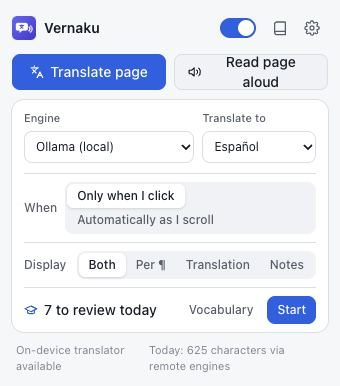
Click the Vernaku icon in the toolbar to open the quick panel.
- 1
Turn the extension on or off, and switch the engine and target language.
- 2
“Translate page” and “Read page aloud” act on the Reddit or X tab that is open.
- 3
The learning row shows how many words are due today; “Start” opens the learning page.
Start reading the English internet today
Add to Chrome